Saphira Script: A Modern Font for Creative and Professional Workflows
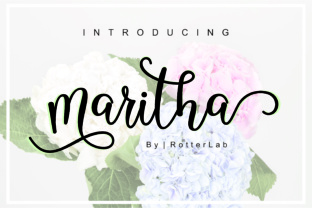
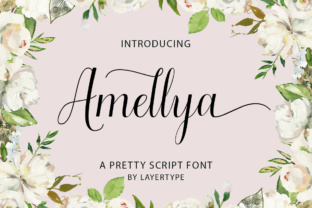
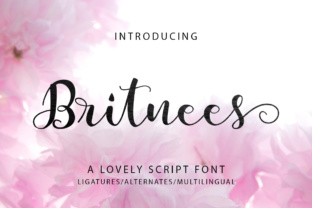
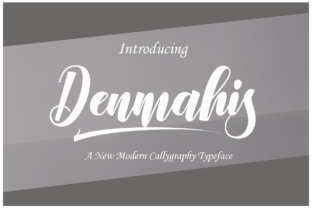
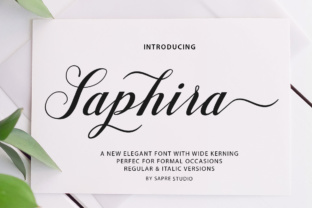
The Saphira Script is a new modern script font that brings a fresh, feminine, and trendy aesthetic to typography. With its irregular baseline and flowing curves, it stands out as a versatile choice for a variety of design projects. Whether you're crafting wedding invitations, designing logos, or adding a personal touch to thank you cards, this font can elevate your work with a unique and elegant style.
Understanding the Features of Saphira Script
Saphira Script is more than just a decorative font—it’s designed with practicality in mind. The irregular baseline adds a natural, handwritten feel, making it ideal for creating a sense of authenticity in your designs. Its trendy and feminine style appeals to a wide range of users, from designers and marketers to entrepreneurs and hobbyists looking to add a personal flair to their work.
This font is particularly well-suited for projects where a soft, organic look is desired. Its clean lines and subtle variations in stroke width ensure readability without sacrificing style. As a result, it's a great fit for both digital and print media, including social media posts, branding materials, and editorial content.
Integrating Saphira Script into Your Design Workflow
When incorporating Saphira Script into your workflow, it's important to consider how it interacts with other design elements. This font works best when paired with sans-serif or serif fonts that provide contrast and balance. For example, using a bold sans-serif font for headings and Saphira Script for body text can create a visually appealing hierarchy.
Before starting a project, it's helpful to determine the tone and purpose of your design. If the goal is to evoke warmth and intimacy—such as in a wedding invitation—Saphira Script can be used extensively. However, for more formal or professional contexts, it should be used sparingly to maintain clarity and professionalism.
Preparation and Compatibility
To ensure smooth integration, check the compatibility of Saphira Script with your design software and platforms. Most modern graphic design tools, such as Adobe Photoshop, Illustrator, and Canva, support a wide range of font formats. Additionally, if you plan to use the font on the web, make sure to convert it to a web-safe format like WOFF or WOFF2.
It's also essential to organize your font library effectively. Categorizing fonts by type and usage can help streamline your workflow and reduce the time spent searching for the right font during a project.
Use Cases for Saphira Script
Saphira Script is incredibly versatile and can be used across various applications. Here are some common use cases:
- Wedding Invitations: The soft, flowing nature of Saphira Script makes it perfect for creating elegant and romantic wedding invitations. It pairs beautifully with floral patterns and vintage illustrations.
- Thank You Cards: Adding a personal touch to thank you cards can be achieved by using Saphira Script for handwritten-style messages or signatures.
- Logos and Branding: For businesses looking to convey a warm and approachable brand identity, Saphira Script can be used in logos or taglines to create a memorable visual impression.
- Quotes and Social Media Posts: The font’s stylish appearance makes it an excellent choice for sharing quotes or promotional content on social media platforms like Instagram or Pinterest.
- Editorial Content: In magazines or blogs, Saphira Script can be used for pull quotes or captions to add a creative flair to the content.
Practical Implementation Tips
When working with Saphira Script, keep these tips in mind to ensure optimal results:
- Balance Readability and Style: While Saphira Script is visually appealing, it’s important to maintain readability. Avoid using it for long blocks of text and instead reserve it for headings, titles, or short phrases.
- Test Different Pairings: Experiment with different font pairings to find the combination that best suits your design. Try pairing it with a complementary sans-serif or serif font for better contrast.
- Adjust Spacing and Kerning: Since Saphira Script has an irregular baseline, adjusting the spacing and kerning between letters can improve the overall appearance and legibility of your text.
- Use Consistently: To maintain a cohesive design, use Saphira Script consistently throughout your project. This will help create a unified visual identity and prevent the design from appearing cluttered.
Long-Term Use and Efficiency
For those who plan to use Saphira Script regularly, it's worth investing in a font management tool. These tools allow you to organize, activate, and deactivate fonts based on your current project needs. This can significantly improve efficiency and reduce the risk of font conflicts or missing characters.
Additionally, maintaining a backup of your font files is crucial. Accidental deletions or software issues can lead to the loss of valuable assets, so storing copies in a secure location is a good practice.
Conclusion
Saphira Script is a modern, versatile font that can enhance a wide range of creative and professional projects. Its unique features and stylish design make it a valuable addition to any designer's toolkit. By understanding how to integrate it into your workflow and using it effectively, you can create visually appealing designs that stand out in today’s competitive market.
Whether you're designing wedding invitations, crafting branding materials, or enhancing social media content, Saphira Script offers a stylish yet functional solution that aligns with both aesthetic and practical requirements. Incorporating this font into your design process can help you achieve a polished, professional look while maintaining a sense of creativity and individuality.